VST3 Dynamic Processing Pitch Shifter Standalone

VenusElasticPitch

Dynamic Elastic Pitch Shifter - Map input level to pitch offset with a Bezier curve for liquid audio effects

Overview

VenusElasticPitch is an innovative dynamic pitch shifting effect plugin that automatically adjusts pitch offset based on the input audio's loudness (level). Through a visual Bezier curve editor, users can customize the mapping relationship between level and pitch to achieve rich "liquid audio" effects.

Whether it's laser drums, monster vocals, Doppler effects, or extreme Chipmunk transformations, VenusElasticPitch handles it all. Three pitch modes (Repitch, Granular, Varispeed) cover an ultra-wide range from ±24 to ±48 semitones.

Interface Preview

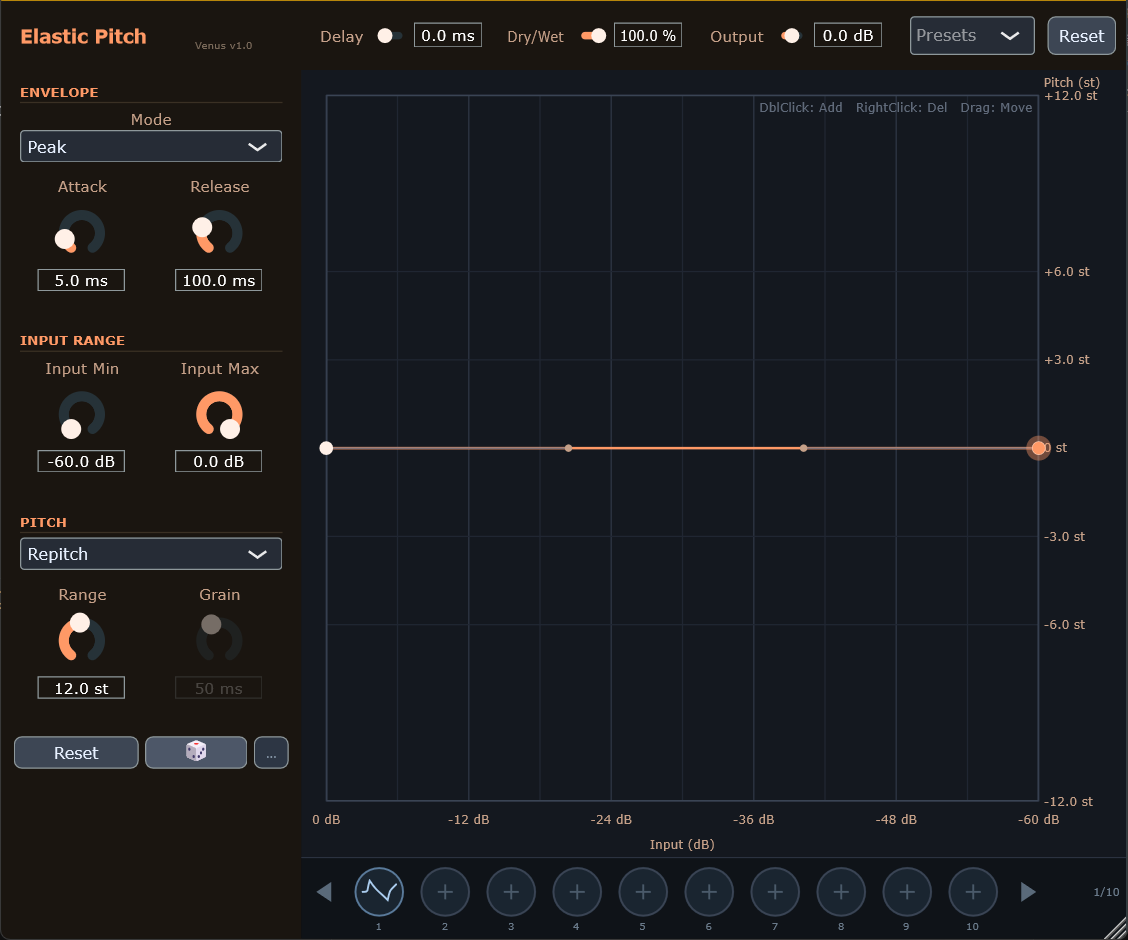
VenusElasticPitch - Main Interface
Main Interface - Bezier Curve Editor
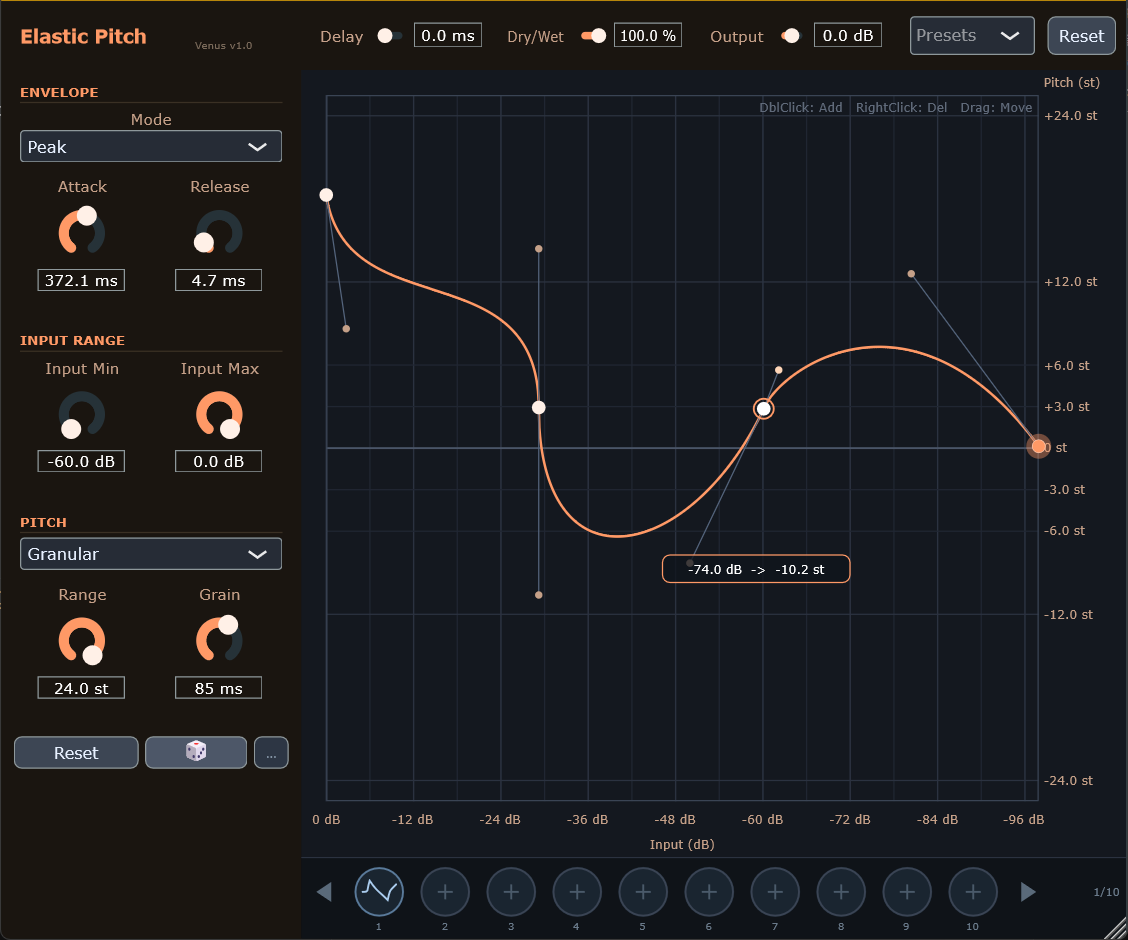
VenusElasticPitch - Custom Curve
Custom Pitch Mapping Curve

Key Features

🎛️

Dynamic Response

Pitch offset follows input level changes in real-time

📈

Visual Curve Editing

Intuitive Bezier curve editor defines transfer function

🔊

Three Pitch Modes

Repitch (tape varispeed), Granular, and Varispeed (extreme range)

⏱️

Lookahead Delay

0-200 ms adjustable, lets the pitch shifter respond before transients

💾

Curve Preset Slots

10 user-saveable curve presets

Real-time Feedback

Dynamic ball shows current level and corresponding pitch offset

Pitch Modes Explained

Repitch Mode (Tape Varispeed)

Principle: Simulates tape machine or vinyl record speed changes by varying the delay line read speed to change pitch.

Characteristics:

  • ✅ Phase-coherent, tight and punchy transients
  • ✅ Physically realistic, warm and natural sound
  • ✅ Low CPU usage
  • ⚠️ Pitch changes affect duration (higher = faster, lower = slower)
  • ⚠️ Maximum range: ±24 semitones

Best for: Drums, kicks, material that needs to retain punch

Granular Mode

Principle: Slices audio into small grains, changes playback speed within each grain, and overlaps them to maintain overall time progression.

Characteristics:

  • ✅ Pitch changes don't affect duration
  • ✅ Great for sustained sounds and vocals
  • ✅ Adjustable grain size (20-200 ms)
  • ⚠️ Large pitch shifts create unique "metallic" artifacts (can be a creative effect)
  • ⚠️ Maximum range: ±24 semitones

Best for: Vocals, pads, material that needs to stay in sync

Varispeed Mode (Extreme Range)

Principle: Uses high-quality linear interpolation resampling to directly change the audio playback rate for extreme pitch transformations.

Characteristics:

  • ✅ Supports ±48 semitones ultra-wide range (±4 octaves)
  • ✅ Clean sound quality, perfect for extreme effects
  • ✅ Low-latency block processing
  • ✅ No granular artifacts
  • ⚠️ Pitch changes affect duration (same as Repitch)

Best for: Chipmunk effects, deep monster growls, extreme Risers/Impacts, sound design

Range Comparison

Mode Maximum Range Algorithm Type Affects Duration
Repitch ±24 st (±2 octaves) Delay line varispeed Yes
Granular ±24 st (±2 octaves) Grain overlap No
Varispeed ±48 st (±4 octaves) Linear interpolation resampling Yes

Parameters

Envelope Detector (ENVELOPE)

Parameter Range Default Description
Mode Peak / RMS Peak Level detection mode. Peak responds faster with more peaks, RMS is smoother
Attack 0.1 - 2000 ms 5 ms Envelope follower rise time (response speed when level increases)
Release 1.0 - 5000 ms 100 ms Envelope follower fall time (response speed when level decreases)

Input Range (INPUT RANGE)

Parameter Range Default Description
Input Min -120 - 0 dB -60 dB Minimum input level for mapping curve
Input Max -120 - 0 dB 0 dB Maximum input level for mapping curve

Pitch Settings (PITCH)

Parameter Range Default Description
Pitch Mode Repitch / Granular / Varispeed Repitch Pitch shifting algorithm mode
Range 1 - 24/48 st 12 st Pitch offset range (±semitones). Repitch/Granular max ±24, Varispeed max ±48
Grain 20 - 200 ms 50 ms Grain size (Granular mode only)

Output Settings (OUTPUT)

Parameter Range Default Description
Delay 0 - 200 ms 0 ms Trigger delay (Lookahead). Lets envelope detection work ahead of signal processing
Dry/Wet 0 - 100% 100% Dry/wet mix ratio. 0% = pure original, 100% = pure pitched signal
Output -24 - +24 dB 0 dB Output gain compensation

⏱️ When to Use Lookahead Delay

Use Lookahead when you want the pitch shifter to "predict" transients: by delaying the audio signal, envelope detection works ahead, so pitch changes are already in place when the attack arrives. Perfect for drums and sound design requiring precise transient control.

Transfer Curve Editor

The curve editor is the core feature of VenusElasticPitch, defining the mapping relationship between input level and pitch offset.

The orange dynamic ball in the curve shows the current input level (X) and corresponding pitch offset (Y) in real-time for intuitive control.

Coordinate Reference

Axis Direction Range Description
X Axis Left → Right 0 dB → -60 dB Input level (high level on left, low level on right)
Y Axis Bottom → Top -Range → +Range st Pitch offset (center line = 0 semitones = original pitch)

Curve Operations

  • Add Node: Double-click on empty area to create a new curve control point
  • Delete Node: Right-click on node to delete (endpoints cannot be deleted)
  • Move Anchor: Drag white circle to change curve path position
  • Adjust Curvature: Drag gray handles to change Bezier curve arc
  • Endpoint Adjustment: Drag endpoints vertically (X locked, Y freely adjustable)

Built-in Presets

The plugin provides 5 built-in curve presets:

  • Linear - Linear mapping, high level corresponds to high pitch
  • S-Curve - S-shaped curve, fast change in middle, slow at ends
  • Inverted - Reverse mapping, high level corresponds to low pitch (monster vocal effect)
  • Step - Step curve, sudden change at middle position
  • Flat - Flat curve, maintains original pitch (0 st)

Quick Controls

Three quick controls at bottom-left:

Button Function
Reset Reset all parameters and curve to defaults
🎲 Randomize selected parameters (based on random options)
Open random options panel, set which parameters participate in randomization

Curve Preset Slots

10 circular preset slots below the editor:

  • Load Preset: Click slot to load saved curve preset
  • Save Preset: Hover → click gear → "Save Current Curve"
  • Delete Preset: Hover → click gear → "Delete Preset"

Presets saved in: ~/Documents/VenusSound/Presets/elastic_pitch_presets.json

Use Cases

Laser Drums

Settings: Pitch Mode: Repitch, Curve: Linear, Range: 12-24 st, Attack: 0.1-5 ms, Release: 50-150 ms
Effect: Turn kicks into laser gun "pew-pew" sounds (high volume → high pitch, decay → low pitch).

Monster Vocals

Settings: Pitch Mode: Granular, Curve: Inverted, Range: 6-12 st, Attack: 5-20 ms, Release: 100-300 ms
Effect: When vocals get loud, pitch automatically drops to create monster-like growls.

Doppler Whoosh

Settings: Pitch Mode: Repitch, Curve: S-Curve, Range: 12-24 st, Attack: 50-100 ms, Release: 200-500 ms
Effect: Add Doppler effect to transitions (Risers/Downlifters), sounding like audio rushing past.

Liquid Pads

Settings: Pitch Mode: Granular, Curve: S-Curve, Range: 3-6 st, Attack: 200-500 ms, Release: 1000-2000 ms, Grain: 100-200 ms
Effect: Pad timbre slowly evolves with dynamics, creating flowing "liquid audio" feel.

Precise Transient Pitch (with Lookahead)

Settings: Pitch Mode: Repitch, Curve: Linear, Range: 12 st, Attack: 0.1-1 ms, Release: 50-100 ms, Delay: 5-20 ms
Effect: With Lookahead delay, pitch shifter responds before transients arrive for precise dynamic control.

Extreme Chipmunk (Varispeed)

Settings: Pitch Mode: Varispeed, Curve: Linear, Range: 36-48 st, Attack: 1-5 ms, Release: 50-100 ms
Effect: Use Varispeed's ±48 semitone range to create extreme cartoon Chipmunk effects. High volume = pitch soars 3-4 octaves.

Abyss Growl (Varispeed)

Settings: Pitch Mode: Varispeed, Curve: Inverted, Range: 36-48 st, Attack: 10-30 ms, Release: 200-500 ms
Effect: Use Varispeed's extreme downward range to turn vocals or drums into deep abyss-like sub-bass monster sounds. Cleaner than Granular, no grain artifacts.

Extreme Riser/Impact (Varispeed)

Settings: Pitch Mode: Varispeed, Curve: S-Curve, Range: 48 st, Attack: 100-500 ms, Release: 500-2000 ms
Effect: Create extreme pitch sweeps for Risers or Impacts, covering a full 8-octave range (-4 to +4 octaves).
Technical Specifications

Format VST3 / Standalone
Sample Rate Any (auto-adaptive)
Channels Mono / Stereo
Latency 0 - 200 ms (adjustable Lookahead) + internal pitch shifter latency
LUT Resolution 1024 points
Curve Sampling 256 points per segment
GUI Refresh Rate 30 Hz
Pitch Modes Repitch / Granular / Varispeed
Pitch Range (Repitch) ±1 - ±24 semitones
Pitch Range (Granular) ±1 - ±24 semitones
Pitch Range (Varispeed) ±1 - ±48 semitones
Grain Size 20 - 200 ms (Granular mode)
Pitch Smoothing 10 ms (prevents zipper noise)
Window Size 900 × 750 pixels
Preset Slots 10 user-saveable curves
Download Build Windows 10+ (x64)

Download VenusElasticPitch

v1.01
Format VST3 / Standalone
System Requirements Windows 10+ (x64)
Updated 2026-01-31

📦 Installation Instructions

  1. Download and extract the RAR file
  2. Copy the VenusElasticPitch.vst3 folder to your VST3 plugin directory:
    C:\Program Files\Common Files\VST3\
  3. For Standalone, run VenusElasticPitch.exe directly
  4. Restart your DAW and scan for plugins

📅 Changelog

  • v1.01 (2026-01) - Reset All button; Random dice button; Random options panel; Input Min/Max slider interlock; Curve state persistence fix
  • v1.00 (2025-12) - Initial release: Core dynamic pitch shifting; Three pitch modes (Repitch/Granular/Varispeed); Bezier curve editor; Varispeed supports ±48 semitones