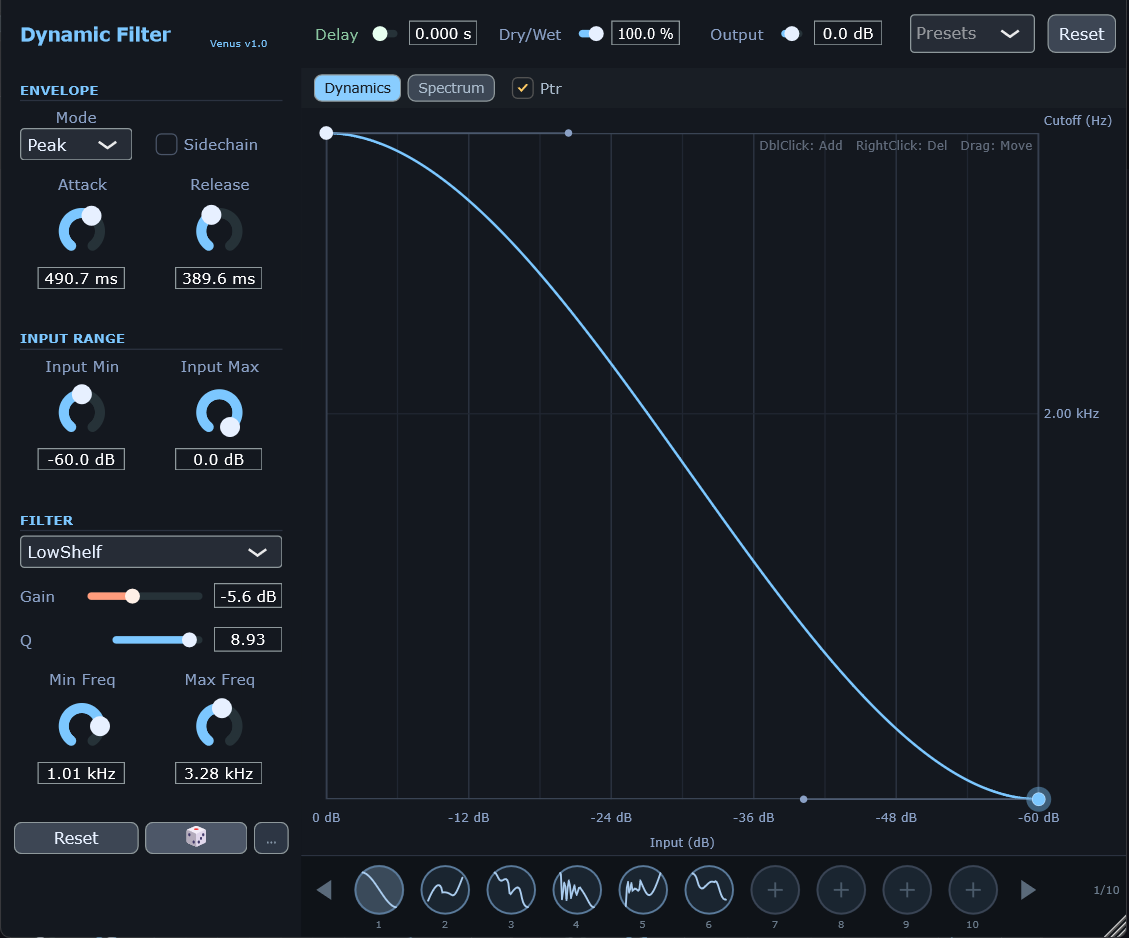
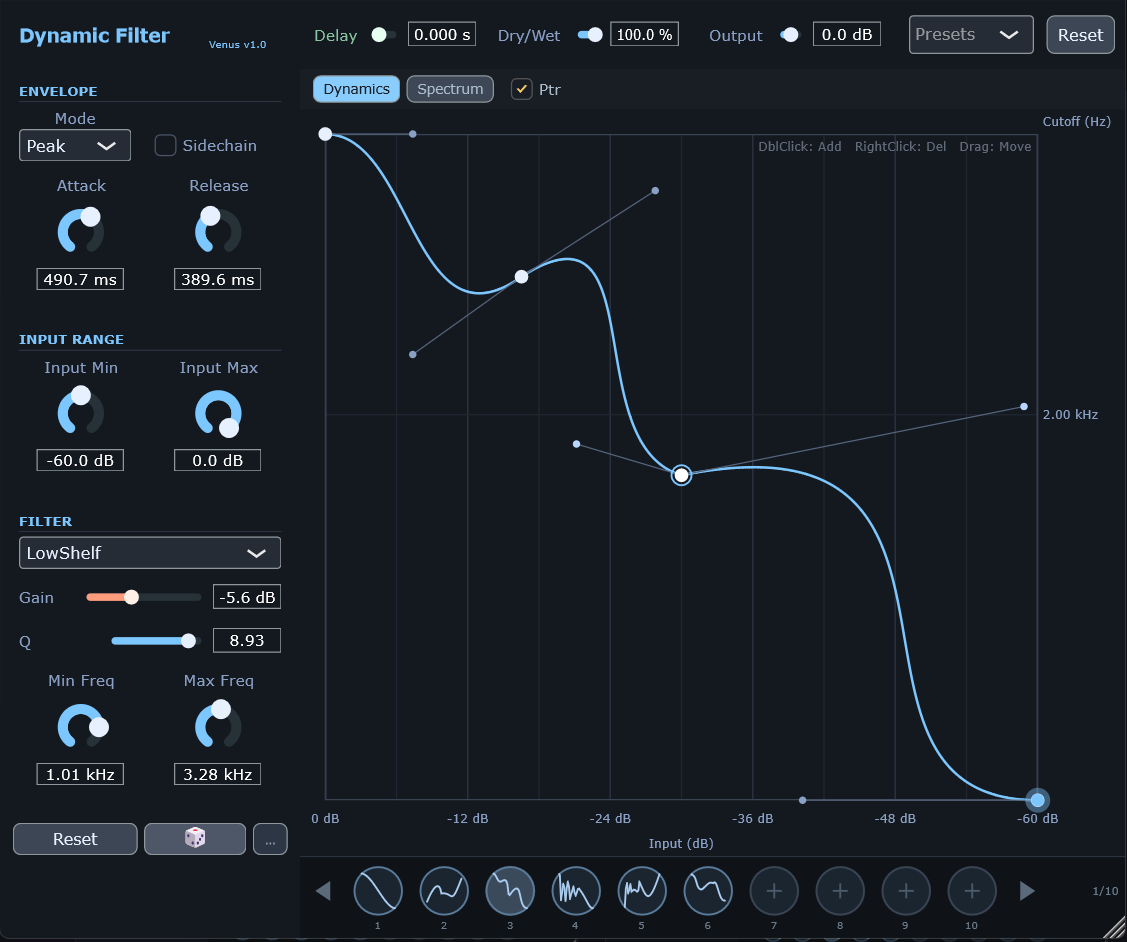
VenusDynamicFilter is an innovative dynamic filter effect plugin that automatically adjusts the filter's cutoff frequency
based on the input audio's loudness (level). Through a visual Bezier curve editor, users can customize the mapping
relationship between level and frequency to achieve rich dynamic filtering effects.
Beyond classic Auto-Wah, dynamic brightness control, and rhythmic gating, you can use Trigger Delay (0–10s)
to let the transient speak first and bring the filter movement in later. You can also enable Sidechain
to drive the envelope from an external signal—perfect for “kick makes the pad breathe” style dynamic filtering.
Interface Preview
Linear Transfer CurveCustom Bezier Curve
Video Demo
Watch the plugin demo:
Usage Demo
Video by: XMNoise, Jack Wang
Key Features
🎛️
Dynamic Response
Filter cutoff frequency follows input level in real-time
📈
Visual Curve Editing
Intuitive Bezier curve editor defines transfer function
🔊
Multiple Filter Modes
6 types: LP / HP / BP + LowShelf / HighShelf / Peak
⏱️
Trigger Delay
0–10s: delay the envelope response for “late filter entry”
🔗
Sidechain Input
Drive the envelope from external audio
⚡
Real-time Feedback
A moving dot shows current level → cutoff mapping
Parameters
Envelope Detector (ENVELOPE)
Parameter
Range
Default
Description
Mode
Peak / RMS
Peak
Level detection mode. Peak responds faster, RMS is smoother
Sidechain
On / Off
Off
When enabled, the envelope follows the external sidechain input
Only for Shelf/Peak types (disabled for Pass types)
Resonance / Q
0 - 100% / 0.50 - 10.00
0% / 0.707
Pass types show Resonance; Shelf/Peak show Q (higher Q = narrower band)
Min Freq
20 - 2000 Hz
20 Hz
Minimum cutoff frequency for curve output
Max Freq
500 - 20000 Hz
20000 Hz
Maximum cutoff frequency for curve output
💡 Resonance vs Q
LowPass / HighPass / BandPass: shows Resonance (0–100%) to emphasize the cutoff peak.
LowShelf / HighShelf / Peak: shows Q (0.50–10.00) to control bandwidth (higher Q = narrower).
Min/Max frequency are auto-swapped internally to ensure Min < Max.
Output Settings (OUTPUT)
Parameter
Range
Default
Description
Trig Delay
0 - 10 s
0 s
Delays the envelope response (0.001s precision)
Dry/Wet
0 - 100%
100%
Dry/wet mix ratio
Output
-24 - +24 dB
0 dB
Output gain compensation
⏱️ When to use Trigger Delay
Use it when you want the transient to stay clean and bring the filter movement in later (e.g. 50–200ms),
or push it further (1–3s) for slow, dreamy timbral evolution.
Transfer Curve Editor
The curve editor is the core feature of VenusDynamicFilter, defining the mapping relationship
between input level and filter cutoff frequency.
The moving dot shows the current envelope level (X) and the resulting cutoff frequency (Y) in real-time.
Coordinate Reference
Axis
Direction
Range
Description
X Axis
Left → Right
0 dB → -60 dB
Input level (high level on left, low level on right)
Y Axis
Bottom → Top
20 Hz → 20 kHz
Filter cutoff frequency (logarithmic scale)
Curve Operations
Add Node: Double-click on empty area to create a new curve control point
Delete Node: Right-click on node to delete (endpoints cannot be deleted)
Move Anchor: Drag white circle to change curve path position
Adjust Curvature: Drag gray handles to change Bezier curve arc
Endpoint Adjustment: Drag endpoints vertically (X locked, Y freely adjustable)
Built-in Presets
The plugin provides 5 built-in curve presets:
Linear - Linear mapping, input level proportional to cutoff frequency
S-Curve - S-shaped curve, fast change in middle, slow at ends
Inverted - Reverse mapping, high level corresponds to low frequency
Step - Step curve, sudden change at middle position
Flat - Flat curve, output fixed at middle frequency
Use Cases
Auto-Wah Effect
Settings: Filter Type: LowPass, diagonal curve from bottom-left to top-right, Attack: 5-20 ms, Release: 50-150 ms Effect: The harder you play, the more the filter opens, simulating classic envelope filter effects.
Dynamic Brightness Control
Settings: Filter Type: LowPass, inverted curve (top-left to bottom-right), Attack: 50-100 ms, Release: 200-500 ms Effect: Stays bright at lower volumes, darkens as volume increases. For controlling material with high dynamic range.
Rhythmic Gate Effect
Settings: Filter Type: HighPass, steep step curve, Attack: 1-5 ms, Release: 100-300 ms Effect: Opens high frequencies on hits, creating rhythmic filter effects.
Smooth Atmosphere
Settings: LowPass, S-curve, Attack: 200–500 ms, Release: 1000–2000 ms Effect: Slow movement following overall dynamics for flowing timbre changes.
Late Filter Entry (Trigger Delay)
Settings: LowPass, diagonal curve, Attack: 5–20 ms, Release: 100–300 ms, Trig Delay: 0.05–0.2 s Effect: Transient first, motion later—great for creative SFX and articulation.
Sidechain Dynamic Filtering
Settings: Main: pad/sustains; Sidechain: drums; Sidechain: On; LowPass; diagonal curve; Attack: 1–10 ms; Release: 100–300 ms Effect: The pad “breathes” with the drum hits.
Slow Follower (Long Trigger Delay)
Settings: LowPass, S-curve, Attack: 500–1000 ms, Release: 1000–2000 ms, Trig Delay: 1–3 s Effect: Deeply lagged movement for slow, dreamy evolution.
Copy the VenusDynamicFilter.vst3 folder to your VST3 plugin directory:
C:\Program Files\Common Files\VST3\
Restart your DAW and scan for plugins
📅 Changelog
v1.03 - Reset All button: one-click reset for all parameters and curve; Random dice button: quick parameter randomization; Random options panel: independent control for each parameter; Fixed curve state persistence issue
v1.02 - Spectrum View: real-time FFT spectrum analyzer; Filter response curve: real-time display of filter frequency response; Pro-Q level display: Decay physics model with brightness fade; Ptr toggle: control frequency pointer visibility