1. Select a Module
Browse available modules in the visual card interface. Modules are grouped by category (Sound Design, Color, Edit, Navigation) and can be searched by name. Click any module card to enter the configuration view.
DAW Automation Orchestration Engine for Nuendo / Cubase — embedded Lua 5.4 scripting platform with visual module card interface and 25+ workflow modules
VenusSYNAPSE is a VST3 instrument plugin that provides a programmable workflow automation platform for Nuendo and Cubase Pro. It transforms Nuendo's Project Logical Editor (PLE) from a static tool into a programmable automation engine, enabling professional sound designers to complete complex workflows that previously required hours of manual work — all from a single visual interface.
Professional sound designers working in game audio, film post-production, and broadcast frequently need to perform repetitive batch operations — color-coding hundreds of events, renaming assets to match game engine conventions, layering sound effects with precise timing, or bulk-editing fades and positions. While Nuendo's PLE is powerful, managing and combining multiple PLE presets becomes increasingly difficult as workflow complexity grows.
SYNAPSE solves this by providing an embedded Lua 5.4 scripting engine and a visual module card interface. Users simply select a module, configure parameters, and click execute — the plugin automatically generates native-format PLE presets and triggers execution at runtime. Developers and power users can also define their own modules using simple Lua scripts, with the plugin automatically generating the corresponding GUI.
Fully embedded Lua 5.4 VM — define complex automation workflows with concise scripts
No coding required — browse, select, configure, and execute modules visually
Edit Lua module files and see changes instantly without restarting your DAW
Automatically generates and executes native Nuendo PLE presets — no manual preset management
Chain multiple operations into a single workflow and execute complex batch tasks with one click
Declare parameter types in Lua and get beautiful GUI controls generated automatically
Examples / Community / User directories for distributing, sharing, and creating custom modules
64MB memory cap and instruction counter to prevent runaway scripts
Watch VenusSYNAPSE in action:
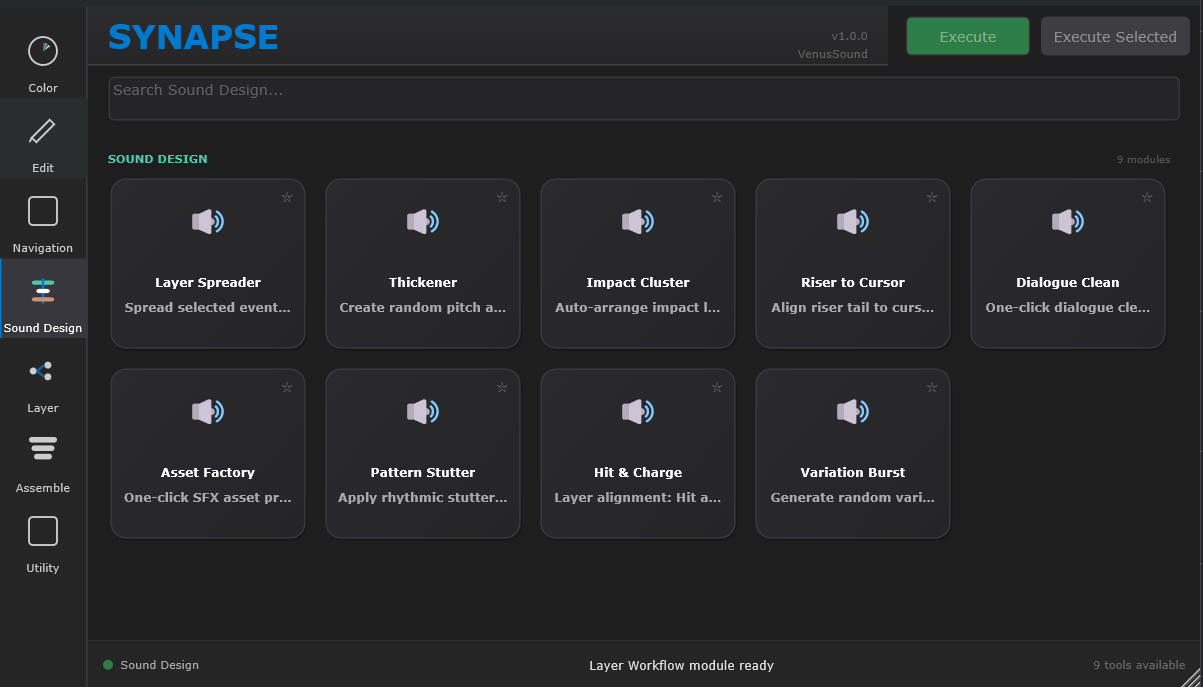
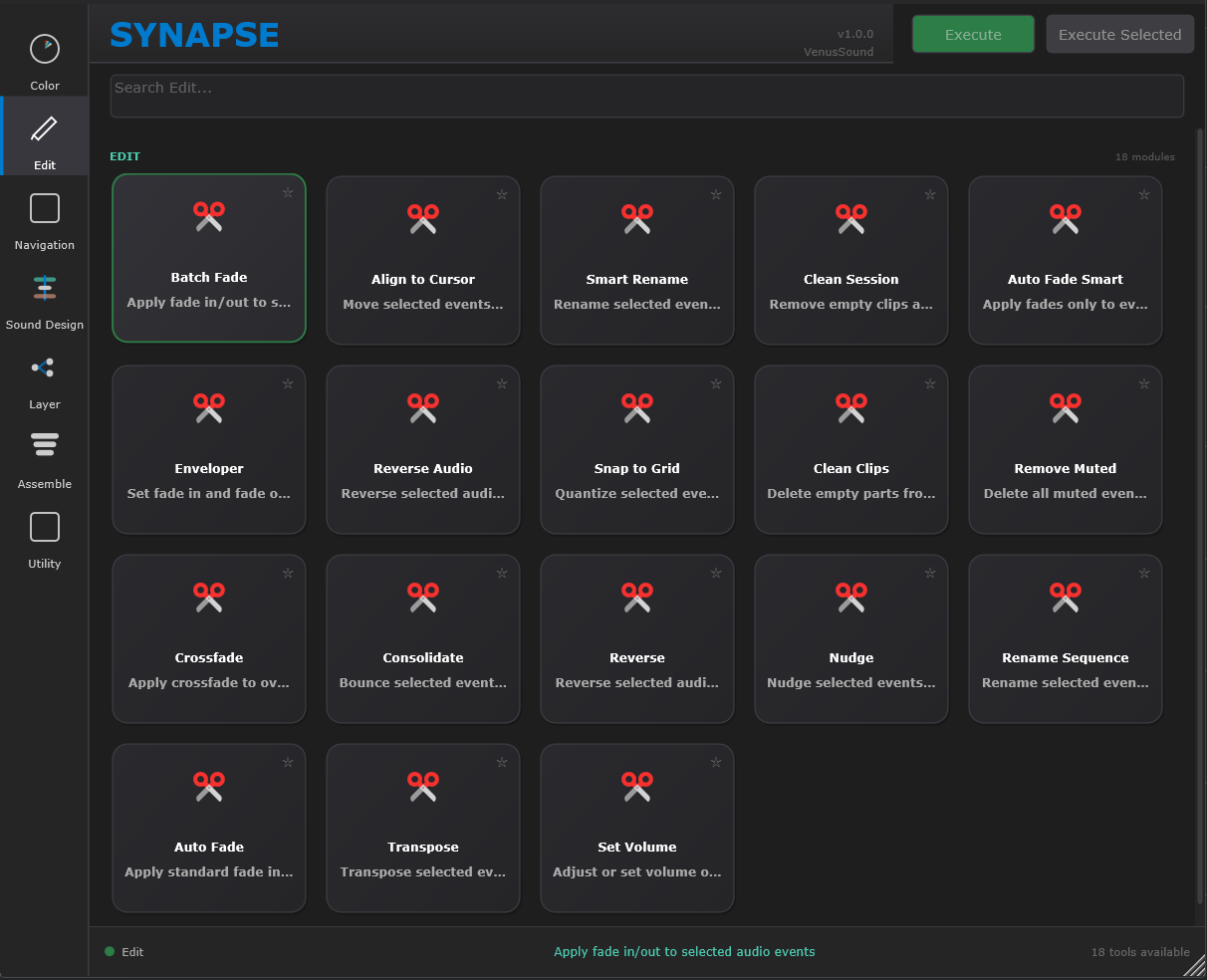
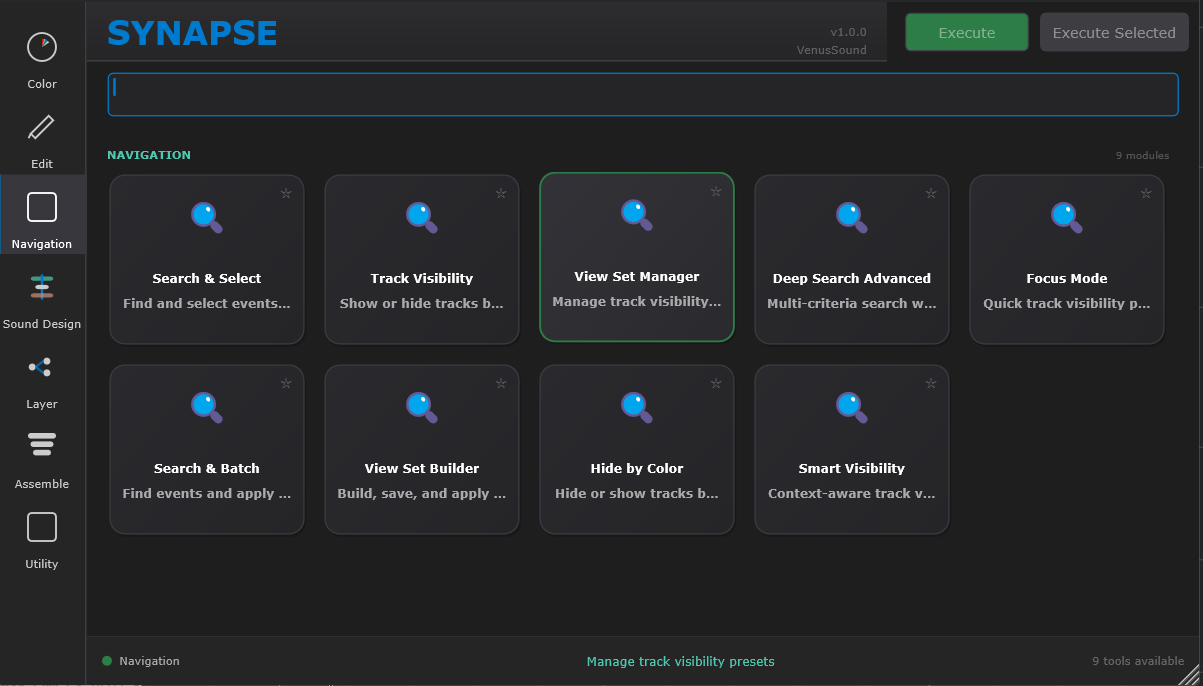
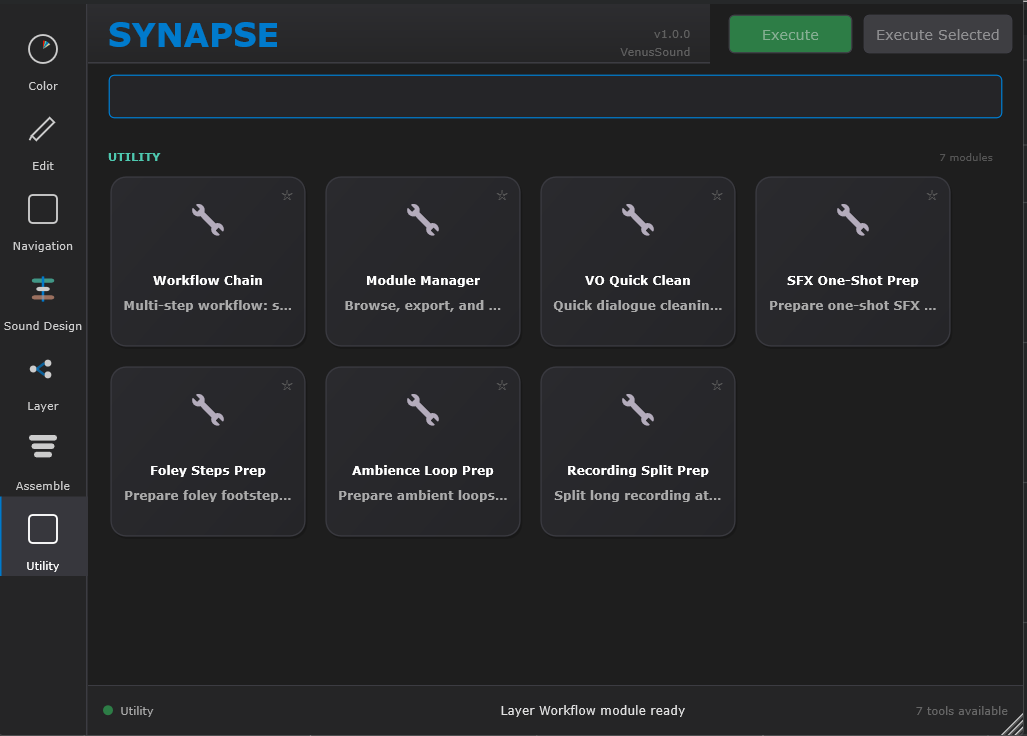
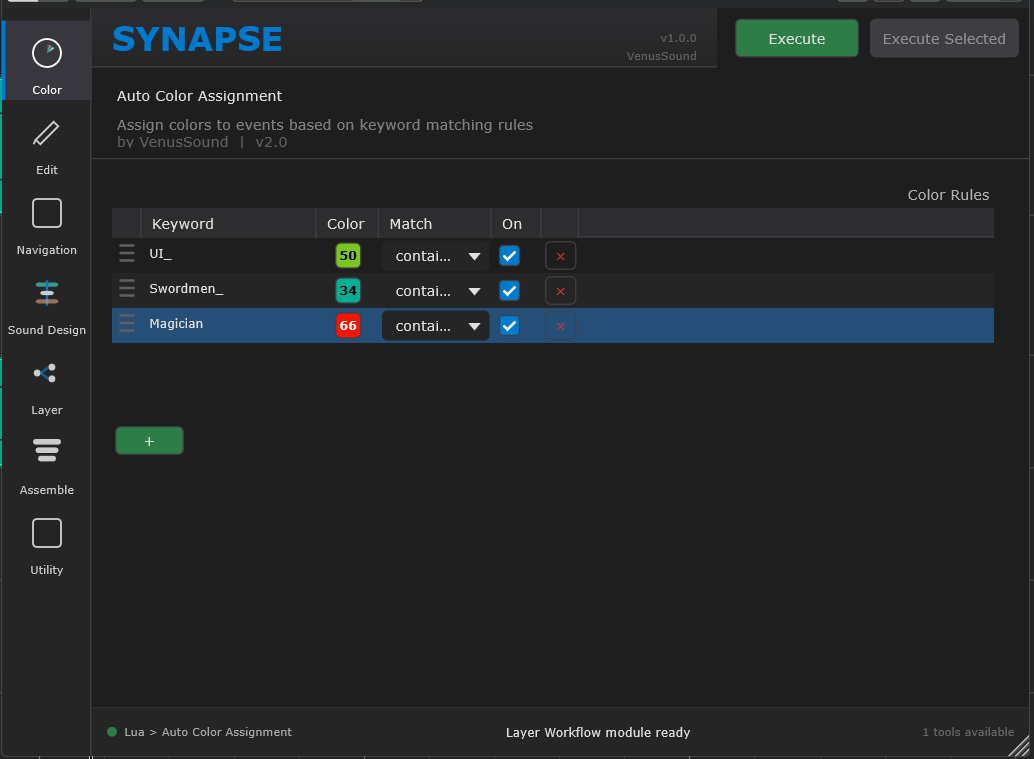
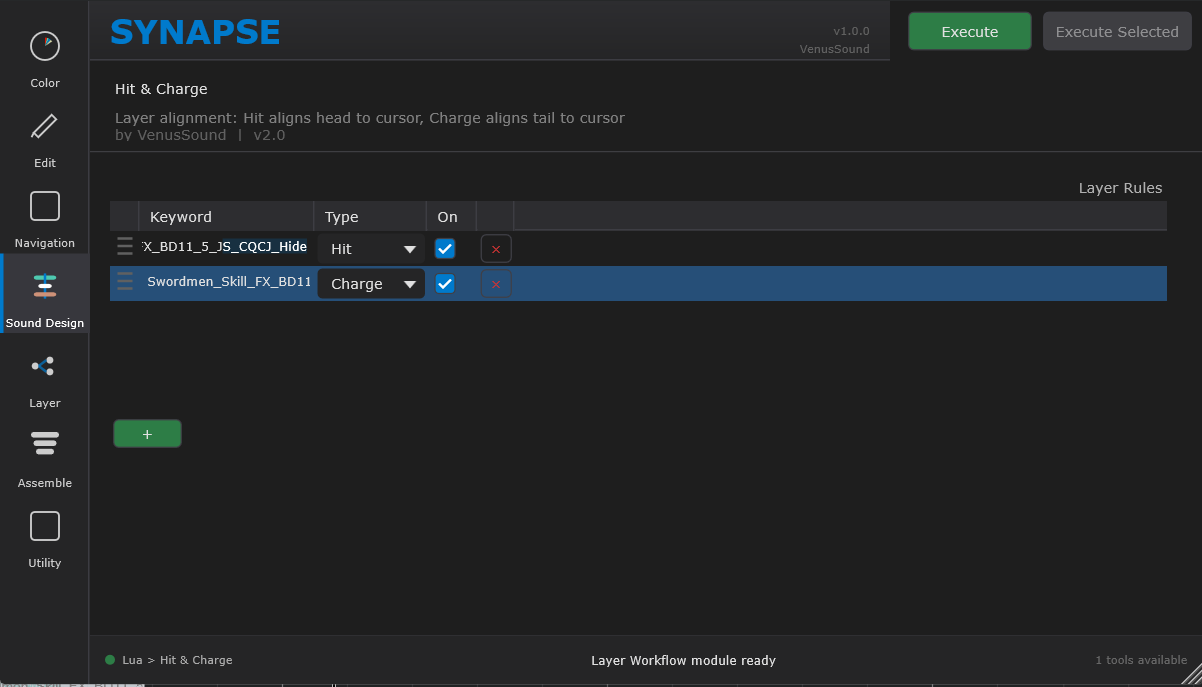
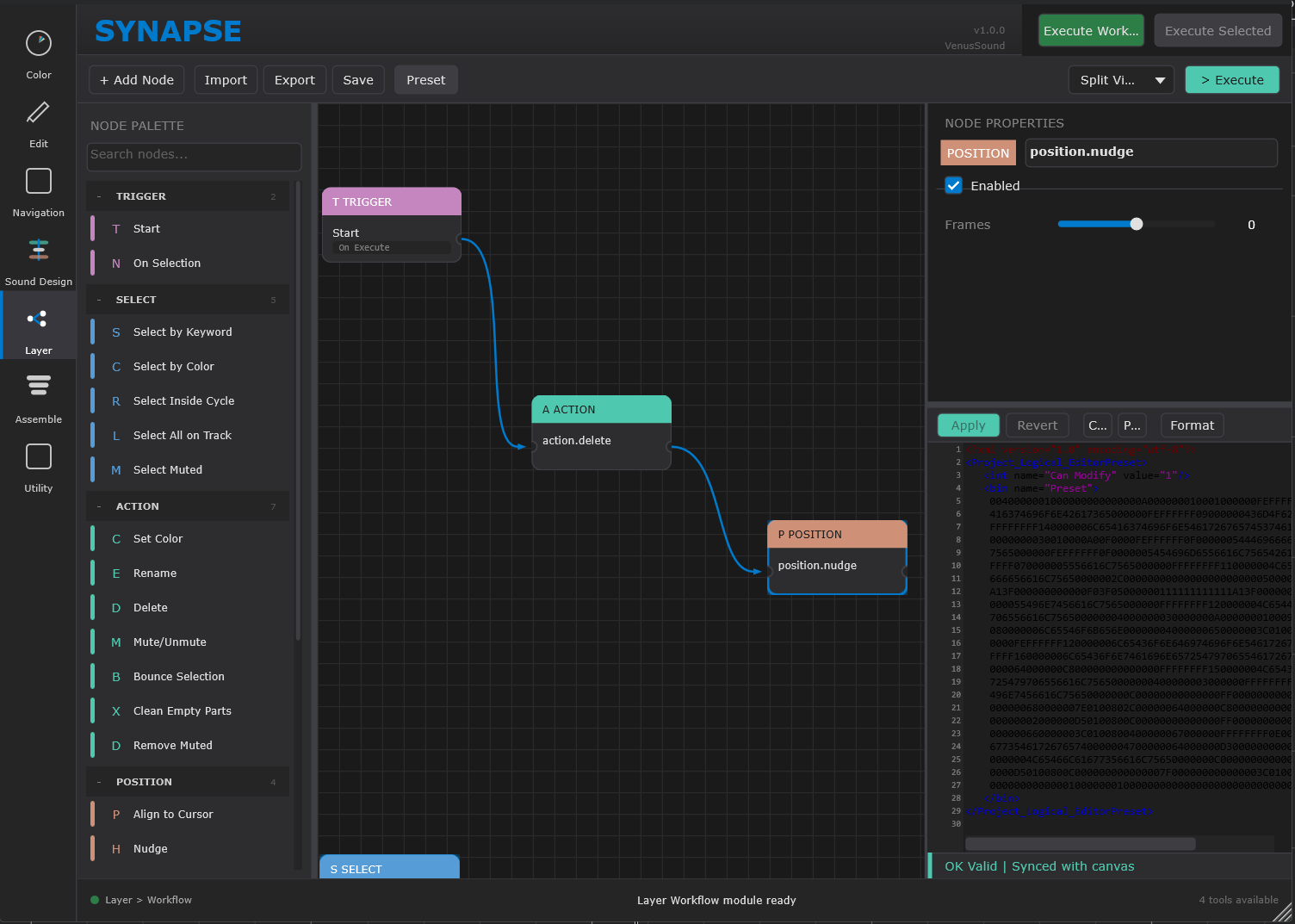
SYNAPSE embeds a full Lua 5.4 virtual machine with a sandboxed execution environment. Users can define workflow modules using concise Lua scripts, declaring parameters (integers, floats, selectors, color pickers, rule lists, etc.) that automatically generate corresponding GUI controls. A complete module can be written in just a few dozen lines of code.
The following example shows a complete Lua module that batch-colors events based on keyword rules:
-- A complete Lua module in just a few dozen lines
local m = synapse.module {
    name = "Auto Color Assignment",
    category = "color",
    description = "Batch-color events by keyword rules"
}

m:param("rules", "rule_list", {
    label = "Color Rules",
    columns = {
        { id = "keyword", type = "string", label = "Keyword" },
        { id = "color",   type = "color",  label = "Color" },
    }
})

function m:execute(p)
    local batch = {}
    for _, rule in ipairs(p.rules) do
        local ple = synapse.ple.create()
        ple:filter_by_name(rule.keyword, "contains")
        ple:action_set_color(rule.color)
        table.insert(batch, { ple = ple, name = rule.keyword })
    end
    synapse.run_batch(batch)
end
After declaring parameter types via m:param(), SYNAPSE automatically generates the corresponding GUI controls.
Supported types include integers, floats, strings, selectors, color pickers, rule lists, and more.
Module developers only need to focus on automation logic — no GUI code required.
Modules are saved as .lua files in designated directories.
SYNAPSE's ModuleLoader continuously monitors these directories, automatically detecting new and modified files for hot reload without restarting the DAW.
| Directory | Description |
|---|---|
| Examples | Example modules shipped with the plugin, demonstrating features and API usage |
| Community | Community-contributed modules available for download |
| User | User-created modules, freely created and modified |
SYNAPSE v3.0 ships with 25+ workflow modules covering the full sound design pipeline:
| Module | Description |
|---|---|
| Layer Spreader | Distribute selected events across layers with precise timing offsets |
| Thickener | Create variants with randomized pitch/time offsets for thick, layered sounds |
| Impact Cluster | Automatically arrange layered timing for impact sound effects |
| Riser to Cursor | Align riser tail to cursor position with gain/pitch progression curves |
| Dialogue Clean | One-click dialogue cleanup workflow |
| Asset Factory | One-click SFX asset batch preprocessing |
| Pattern Stutter | Apply rhythmic stutter effects |
| Variation Burst | Generate randomized variation combinations |
| Hit & Charge | Layer alignment: Hit onset aligns to cursor / Charge tail aligns to cursor |
| Module | Description |
|---|---|
| Auto Color Assignment | Batch-color events by keyword rules with rule_list parameters |
| Module | Description |
|---|---|
| Align Selected | Align selected events to cursor position |
| Smart Rename | Intelligent batch renaming |
| Clean Session | Clean up sessions (remove empty, muted clips) |
| Batch Fade | Batch fade processing |
| Enveloper | Intelligent fade curves |
| Module | Description |
|---|---|
| Deep Search | Query-based event selection (name, length, media type combined filtering) |
| View Set Manager | Logic-driven track visibility management |
| Focus Mode | Context-aware focus mode |
In addition to the core modules above, SYNAPSE includes 20+ utility modules covering common operations like Snap to Grid, Crossfade, Consolidate, Reverse, Nudge, and more. Users can also create their own modules via Lua scripting to address specific workflow needs.
SYNAPSE simplifies complex DAW automation into three steps:
Browse available modules in the visual card interface. Modules are grouped by category (Sound Design, Color, Edit, Navigation) and can be searched by name. Click any module card to enter the configuration view.
Set parameters based on the module's function — keyword rules, color mappings, timing offsets, filter conditions, and more. All parameter interfaces are automatically generated from the module's Lua script. No need to manually create PLE presets.
Click the execute button and SYNAPSE handles everything automatically. For multi-step workflows, the plugin chains operations and executes them in sequence with no manual intervention required. Complete in seconds what used to take hours.
| Product | VenusSYNAPSE |
| Format | VST3 Instrument |
| Target DAW | Nuendo 15+ / Cubase Pro 15+ |
| Framework | JUCE 8.0, C++20 |
| Scripting Engine | Lua 5.4 (sandboxed execution) |
| Version | v3.0.0 (In Development) |
| Shipped Modules | 25+ (4 categories) |
| Module Directories | Examples / Community / User |
| Sandbox Limits | 64MB memory cap / instruction counter |
| Platform | Windows x64 |
VenusSYNAPSE is in active development. Stay tuned for the official release.
Get Release Notification