VST3 Dynamic Distortion Standalone Sidechain

VenusDynamicDrive

Dynamic Transfer Function Distortion - Dynamically controls saturation based on input level with customizable Bezier curve mapping and 10 distortion algorithms

Overview

VenusDynamicDrive is an innovative dynamic saturation/distortion effect plugin that automatically adjusts the distortion amount (Drive) based on the loudness (level) of the input audio. With a visual Bezier curve editor, users can customize the mapping between input level and distortion intensity, creating rich dynamic distortion effects.

Featuring 10 distortion algorithms (Tanh, Atan, Soft Clip, Hard Clip, Square Wave, Sine Folder, Bit Crush, Asymmetric, Exponential, Custom Curve), 2x oversampling to eliminate aliasing artifacts, Trigger Delay (0-10 seconds) to let transients pass clean before distortion kicks in, and Sidechain input for external envelope control β€” enabling "drum hits drive the distortion" dynamic effects.

Interface Preview

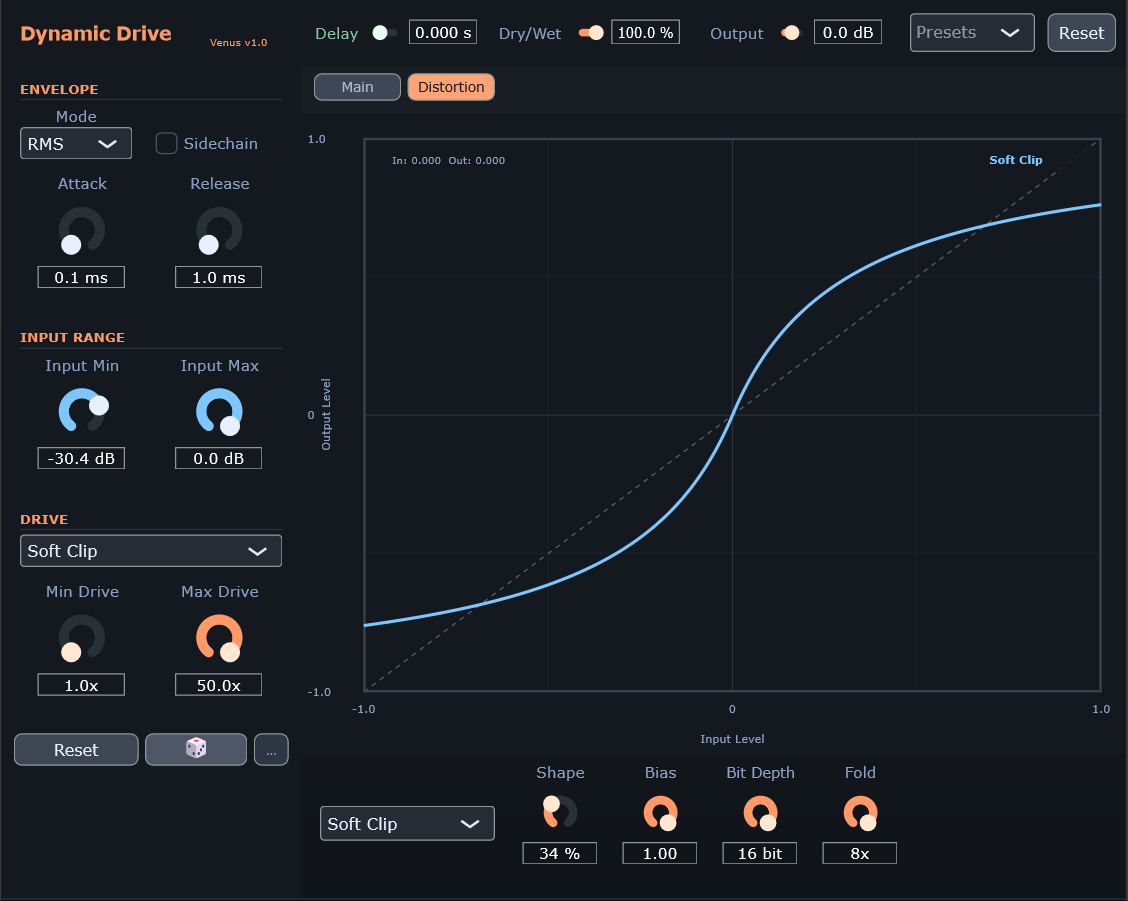
VenusDynamicDrive - Distortion View
Distortion View - Soft Clip transfer curve with real-time operating point

Key Features

πŸŽ›οΈ

Dynamic Response

Distortion intensity tracks input level in real-time

πŸ”Š

2x Oversampling

Built-in IIR half-band anti-aliasing filter eliminates harmonic folding artifacts

πŸ“ˆ

Visual Curve Editor

Intuitive Bezier curve editor defines the level-to-distortion transfer function

πŸ”₯

10 Distortion Algorithms

Tanh / Atan / SoftClip / HardClip / SquareWave / SineFolder / BitCrush / Asymmetric / Exponential / Custom Curve

⏱️

Trigger Delay

0-10 seconds adjustable, let transients pass clean before distortion kicks in

πŸ”—

Sidechain Input

Use external signal to drive envelope detection for rhythmic dynamic distortion

⚑

Real-time Feedback

Dynamic ball shows current level and corresponding distortion amount

πŸ›‘οΈ

Built-in Safety

DC blocking filter + soft limiter (-0.1 dB) prevents DC offset and clipping

Distortion Algorithms

Tanh (Warm) - Hyperbolic Tangent Saturation

Formula: output = tanh(x Γ— drive) / tanh(drive)
Character: Warm, smooth, similar to tube overdrive. Maintains consistent output gain at low Drive values, produces noticeable harmonic distortion at high Drive values.

Atan (Soft) - Arctangent Saturation

Formula: output = (2/Ο€) Γ— atan(x Γ— drive)
Character: Softer compression curve, preserves more dynamics. Natural soft compression characteristics, ideal for scenarios requiring dynamic preservation.

Soft Clip - Soft Clipping Saturation

Formula: output = driven / (1 + |driven|)
Character: Aggressive but smooth, close to hard clipping. Symmetrical soft clipping curve, rich even harmonics.

Hard Clip - Hard Clipping

Formula: output = clamp(x Γ— drive, -1, 1)
Character: Sharp distortion, strong harmonics. Directly truncates signal exceeding threshold, producing intense odd harmonics.

Square Wave - Square Wave Shaping

Character: Rich in odd harmonics. Shape parameter controls the blend between square wave and sine wave (shape=0 pure square, shape=1 pure sine).
Related Parameters: Drive, Shape

Sine Folder - Sine Wave Folding

Character: Complex metallic harmonic texture. Higher Fold values create more wave folding, producing increasingly complex overtone structures.
Related Parameters: Drive, Fold (1-16x)

Bit Crush - Bit Depth Reduction

Character: Digital distortion, Lo-Fi texture. Lower bit depth increases quantization noise, emulating early digital samplers.
Related Parameters: Drive, Bit Depth (1-16 bit)

Asymmetric - Asymmetric Saturation

Character: Rich even harmonics, warm tone. Different processing for positive and negative half-cycles, with the negative half limited to [-1, 0] range. Bias parameter controls tonal brightness.
Related Parameters: Drive, Bias (-1.0 ~ 1.0)

Exponential - Exponential Distortion

Character: Progressive distortion, dynamic response. Higher Shape values create steeper distortion curves. Exponential parameter is clamped to safe range to prevent overflow at extreme Drive values.
Related Parameters: Drive, Shape (0-100%)

Custom Curve - User-defined Curve

Character: Total freedom! Uses the Bezier curve from the Main view as the distortion transfer function. The curve's X-axis maps to input level and Y-axis to output level. Edit the curve in Main view, then switch to Distortion view and select Custom Curve to apply.

Algorithm Comparison

Type Character Related Parameters
Tanh Warm, smooth, tube overdrive Drive
Atan Soft compression, preserves dynamics Drive
Soft Clip Aggressive smooth, even harmonics Drive
Hard Clip Sharp distortion, odd harmonics Drive
Square Wave Rich odd harmonics Drive, Shape
Sine Folder Metallic harmonic texture Drive, Fold
Bit Crush Digital distortion, Lo-Fi Drive, Bit Depth
Asymmetric Even harmonics, warm Drive, Bias
Exponential Progressive, dynamic response Drive, Shape
Custom Curve User-defined Main view curve

Parameters

Envelope Detector (ENVELOPE)

Parameter Range Default Description
Mode Peak / RMS Peak Level detection mode. Peak responds faster with more peaks, RMS is smoother
Sidechain On / Off Off When enabled, uses external sidechain input to drive envelope detection
Attack 0.1 - 2000 ms 10 ms Envelope follower rise time (response speed when level increases)
Release 1.0 - 5000 ms 300 ms Envelope follower fall time (response speed when level decreases)

Input Range (INPUT RANGE)

Parameter Range Default Description
Input Min -120 - 0 dB -60 dB Minimum input level for curve mapping
Input Max -120 - 0 dB 0 dB Maximum input level for curve mapping

Drive Settings (DRIVE)

Parameter Range Default Description
Drive Mode 10 types Tanh Saturation algorithm type
Min Drive 1.0 - 50.0x 1.0x Minimum distortion amount output by the curve
Max Drive 1.0 - 50.0x 20.0x Maximum distortion amount output by the curve

πŸ’‘ Drive Range Interlock

Min Drive and Max Drive are mutually constrained in the GUI, and the DSP has auto-swap logic to ensure Min < Max at all times. Even if you set them in reverse, it works correctly.

Distortion Shape Parameters (Distortion View)

Parameter Range Default Description
Shape 0 - 100% 50% Distortion shape parameter. Affects SquareWave (square/sine blend) and Exponential (curvature)
Bias -1.0 - 1.0 0.0 Bias parameter. Affects Asymmetric distortion DC offset amount
Bit Depth 1 - 16 bit 8 bit Quantization bit depth. Only effective for BitCrush algorithm
Fold 1 - 16x 1x Fold count. Only effective for SineFolder algorithm

Output Settings (OUTPUT)

Parameter Range Default Description
Trig Delay 0 - 10 s 0 s Trigger delay. Delays envelope response so transients pass clean before distortion changes (0.001s precision)
Dry/Wet 0 - 100% 100% Dry/wet mix ratio. 0% = pure original signal, 100% = pure distorted signal
Output -24 - +24 dB 0 dB Output gain compensation

⏱️ When is Trigger Delay useful?

When you want "transients first, distortion later": e.g., let impact sounds/drums keep their clean attack for 50-200ms before the distortion dynamics kick in; or stretch the delay for slow, dreamy tonal evolution effects.

πŸ”— Sidechain Mode

When enabled, the envelope detector uses the external sidechain input instead of the main input. This allows one sound (e.g., drums) to control the distortion dynamics of another (e.g., synth). When the sidechain signal drops below threshold, the Drive naturally falls to minimum (controlled by envelope Release), providing smooth distortion decay rather than abrupt changes.

Transfer Curve Editor

The curve editor is VenusDynamicDrive's core feature, defining the mapping between input level and distortion intensity.

The orange dynamic ball on the curve shows the current input level (X) and corresponding distortion amount (Y) in real-time, providing intuitive visual feedback of "how much distortion is happening right now."

Axis Description

Axis Direction Range Description
X-axis Left β†’ Right 0 dB β†’ -60 dB Input level (loud on left, quiet on right)
Y-axis Bottom β†’ Top 1x β†’ 50x Distortion amount (linear scale)

Curve Operations

  • Add Node: Double-click on empty area to create a new control point
  • Delete Node: Right-click on a node to delete (endpoints cannot be deleted)
  • Move Anchor: Drag white circle to change where the curve passes through
  • Adjust Curvature: Drag gray handles to change Bezier curve bending
  • Endpoint Adjustment: Drag endpoints vertically (X locked, Y freely adjustable)

Built-in Presets

The plugin provides 5 built-in curve presets:

  • Linear - Linear mapping, input level proportional to distortion
  • S-Curve - S-shaped curve, fast change in middle, slow at extremes
  • Inverted - Reverse mapping, loud = less distortion (Gated Fuzz effect)
  • Step - Step curve, abrupt change at midpoint
  • Flat - Flat curve, fixed output at mid-distortion

Quick Controls

Three quick controls at the bottom-left corner:

Button Function
Reset Reset all parameters and curves to defaults
🎲 Randomize selected parameters (based on randomization options)
βš™ Open randomization options panel to choose which parameters to randomize

Distortion View

Switch to the Distortion view to see the real-time distortion transfer curve:

  • Transfer Curve: Shows input level (X-axis -1 to 1) vs output level (Y-axis -1 to 1) relationship
  • Operating Point: Orange dot shows current input/output level position on the curve
  • In/Out Values: Top-left corner displays current input and output level values
  • Algorithm Name: Top-right corner shows current distortion algorithm name
  • Shape Controls: Bottom knobs control Shape, Bias, Bit Depth, Fold parameters

Use Cases

Dynamic Tube Overdrive

Setup: Drive Mode: Tanh, Curve: Diagonal, Attack: 5-20 ms, Release: 50-150 ms, Max Drive: 10-20x
Effect: The harder you play, the more distortion you get β€” emulating a classic tube amplifier response.

Gated Fuzz

Setup: Drive Mode: SoftClip, Curve: Inverted, Attack: 1-5 ms, Release: 100-300 ms, Max Drive: 30-50x
Effect: Louder sounds stay clean, while decaying tails break into crushed distortion. Perfect for creative sound design.

Breathing Distortion

Setup: Drive Mode: Atan, Curve: S-Curve, Attack: 50-100 ms, Release: 200-500 ms, Max Drive: 15-25x
Effect: Distortion smoothly follows musical dynamics, creating a "breathing" overdrive effect.

Rhythmic Gate Distortion

Setup: Drive Mode: SoftClip, Curve: Step, Attack: 1-5 ms, Release: 100-300 ms, Max Drive: 20-40x
Effect: Sudden distortion increase on each hit, creating a rhythmic gating effect.

Delayed Attack Distortion (Trigger Delay)

Setup: Drive Mode: Tanh, Curve: Diagonal, Attack: 5-20 ms, Release: 100-300 ms, Trig Delay: 0.05-0.2 s, Max Drive: 15-30x
Effect: Sound starts clean, then distortion gradually increases after a delay β€” "clean attack first, then get dirty."

Sidechain Dynamic Distortion

Setup: Main Input: Bass/Synth, Sidechain: Kick/Hi-hat, Sidechain: On, Drive Mode: Tanh, Curve: Diagonal, Attack: 1-10 ms, Release: 100-300 ms
Effect: When the kick hits, bass distortion increases; when the kick fades, distortion decreases β€” creating a "pumping" distortion effect.

Lo-Fi Decay Effect

Setup: Drive Mode: SoftClip, Curve: Inverted S-Curve, Attack: 100-200 ms, Release: 500-1000 ms, Max Drive: 40-50x
Effect: Strong signals stay clean, weak signals become crushed β€” emulating the noise floor character of vintage equipment.

Retro Digital Distortion (Bit Crush)

Setup: Drive Mode: Bit Crush, Bit Depth: 6-10 bit, Attack: 1-5 ms, Release: 50-150 ms, Max Drive: 5-15x
Effect: Dynamic bit depth reduction β€” loud sounds keep higher resolution, quiet sounds become grainy. Emulating early digital samplers.

Wave Folding Synthesis (Sine Folder)

Setup: Drive Mode: Sine Folder, Fold: 4-8x, Attack: 1-10 ms, Release: 100-300 ms, Max Drive: 10-30x
Effect: Produces complex metallic harmonic textures, similar to wavetable synthesizer tones. Great for experimental and electronic music.

Warm Asymmetric Distortion

Setup: Drive Mode: Asymmetric, Bias: 0.2-0.5, Attack: 10-30 ms, Release: 100-300 ms, Max Drive: 10-25x
Effect: Rich even harmonics creating warm tube-style overdrive. Bias parameter controls tonal brightness.
Specifications

Format VST3 / Standalone
Sample Rate Any (auto-adapting, supports 44.1kHz - 192kHz+)
Oversampling 2x IIR half-band polyphase filter (low-latency anti-aliasing)
Channels Mono / Stereo
Sidechain Input Optional, Mono / Stereo
Distortion Algorithms 10 (including user-defined Custom Curve)
Drive Range 1.0x - 50.0x
Bit Depth Range 1 - 16 bit
Fold Range 1 - 16x
Trigger Delay 0 - 10 seconds (0.001s precision)
LUT Resolution 1024 points
Curve Sampling 256 points per segment
GUI Refresh Rate 30 Hz (active view only)
DC Blocker Cutoff ~20 Hz (auto-adapting to sample rate)
Built-in Limiter -0.1 dB (fixed threshold)
Parameter Smoothing 5 ms (Drive / DryWet / OutputGain / Shape / Bias)
Plugin Latency Oversampling filter delay only (~2-4 samples)
Window Size 900 Γ— 820 pixels (scalable 50%-200%)
Download Windows 10+ (x64)

Download VenusDynamicDrive

v1.20
Format VST3 / Standalone
Requirements Windows 10+ (x64)
Updated 2026-02-14

πŸ“¦ Installation

  1. Download and extract the RAR file
  2. Copy the VenusDynamicDrive.vst3 folder to VST3 plugin directory:
    C:\Program Files\Common Files\VST3\
  3. Standalone version can be run directly via VenusDynamicDrive.exe
  4. Restart your DAW and scan for plugins

πŸ“… Changelog

  • v1.20 (2026-02) - Quality & Stability: 2x oversampling (IIR half-band polyphase filter); full parameter smoothing (DryWet/OutputGain/Shape/Bias 5ms); dynamic delay buffer (44.1k-192kHz+); fixed Exponential NaN; fixed Asymmetric output range; fixed Sidechain mute discontinuity
  • v1.10 (2026-02) - Feature expansion: 10 distortion algorithms; Distortion view (real-time transfer curve + operating point); Shape/Bias/Bit Depth/Fold controls; DC blocking filter; Main/Distortion dual-view toggle
  • v1.00 (2025-01) - Initial release: Core dynamic distortion; 3 saturation algorithms (Tanh/Atan/SoftClip); Bezier curve editor; Envelope follower (Peak/RMS); Sidechain input; Trigger Delay; Built-in soft limiter; Standalone audio player